Email for kids
Your child needs an email address for school, for grandma or for their first tablet. Here are the four ways to give them one, what each lets you do as a parent, and what happens when they turn 13.
Updated October 2026
Short answer
Which first address fits?
The four ways, side by side
We read Google's, Apple's and each service's own pages in October 2026 for this comparison.
| Option | Who creates it | Cost | What a parent can do | At 13 |
|---|---|---|---|---|
| Gmail with Family Link | A parent, in Family Link | Free | Sign in and read it, block senders on the child's device. Spam never reaches the inbox | Google emails you both. Your settings stay until the account is updated |
| Apple child account | A parent, in Family Sharing | Free, with an Apple device | Screen Time limits on the device. No mail-specific controls listed | The child account ends (at 18 in Texas) |
| Email made for kids | A parent | Subscription, after a trial | Approve contacts, hold mail from strangers, get copies, set hours | The address is on the service's name, like @kidsemail.org |
| Your family's own domain | A parent, in the family's account | Part of the family's plan | Create the mailbox, set and change the password, remove it | Nothing changes. The address is the family's, for good |
Gmail with Family Link
- Who creates it
- A parent, in Family Link
- Cost
- Free
- What a parent can do
- Sign in and read it, block senders on the child's device. Spam never reaches the inbox
- At 13
- Google emails you both. Your settings stay until the account is updated
Apple child account
- Who creates it
- A parent, in Family Sharing
- Cost
- Free, with an Apple device
- What a parent can do
- Screen Time limits on the device. No mail-specific controls listed
- At 13
- The child account ends (at 18 in Texas)
Email made for kids
- Who creates it
- A parent
- Cost
- Subscription, after a trial
- What a parent can do
- Approve contacts, hold mail from strangers, get copies, set hours
- At 13
- The address is on the service's name, like @kidsemail.org
Your family's own domain
- Who creates it
- A parent, in the family's account
- Cost
- Part of the family's plan
- What a parent can do
- Create the mailbox, set and change the password, remove it
- At 13
- Nothing changes. The address is the family's, for good
The four ways, one by one
In the US, a child must be 13 to manage their own Google account. Younger kids can have one only if a parent creates it in the Family Link app. That gives you a few real tools: you can sign in to the account and read the mail, block a sender on your child's device, and Gmail never delivers spam to a child under 13, not even to the spam folder. Ads are off too.
What it doesn't give you: alerts, an approved list of who can write, or copies of what arrives. At 13, Google emails you and your child about updating the account. Your settings stay until then, and Google says a child needs a parent's approval to stop supervision until 18. If you added supervision to an account your child already had, you can't reset its password and the under-13 Gmail rules don't apply at all.
Apple asks a parent to create the account for any child under 13, through Family Sharing. In Texas, Apple now keeps it a child account until 18. Your child can add an iCloud email address to it, and you get Screen Time on their devices: schedules, app limits, website limits and a list of who they can call and message. Apple's pages list Phone, FaceTime and Messages for that contact list, and don't mention Mail.
Services like KidsEmail and Tocomail are built for young children, and they give a parent the most control. You keep a list of approved contacts. Mail from anyone else waits in a holding box until you let it through. You can get a copy of what your child sends and receives, and set the hours when they can use it.
The trade-off is the address. It's on the service's name, such as @kidsemail.org, and many kids outgrow it by middle school. Then they start over somewhere else, and everyone who knew the old address has to learn the new one.
The fourth way is to give your child an address on a domain your family owns, like emma@smiths.family. This is what InboxFamily does, so take this part with that in mind.
You create the mailbox from the family's account and choose the password. Your child signs in with that address and password, and has no account of their own anywhere else. You can change the password or remove the mailbox whenever you need to. Nothing happens at 13: the address belongs to the family, not to an app's age rules, so it can follow your child to high school, college and a first job.
What we don't do: approve contacts, hold mail from strangers, or send you copies. For a seven-year-old, that's what a kids' service is for, and it's a fine place to start. Children's mailboxes also can never be connected to an AI assistant, whoever tries. In the US, when you mark a mailbox as a child's, you are giving the permission the law asks for before a child under 13 gets an email account.
Rules that work with any address
Go through them with your child and tick the ones you agree on.
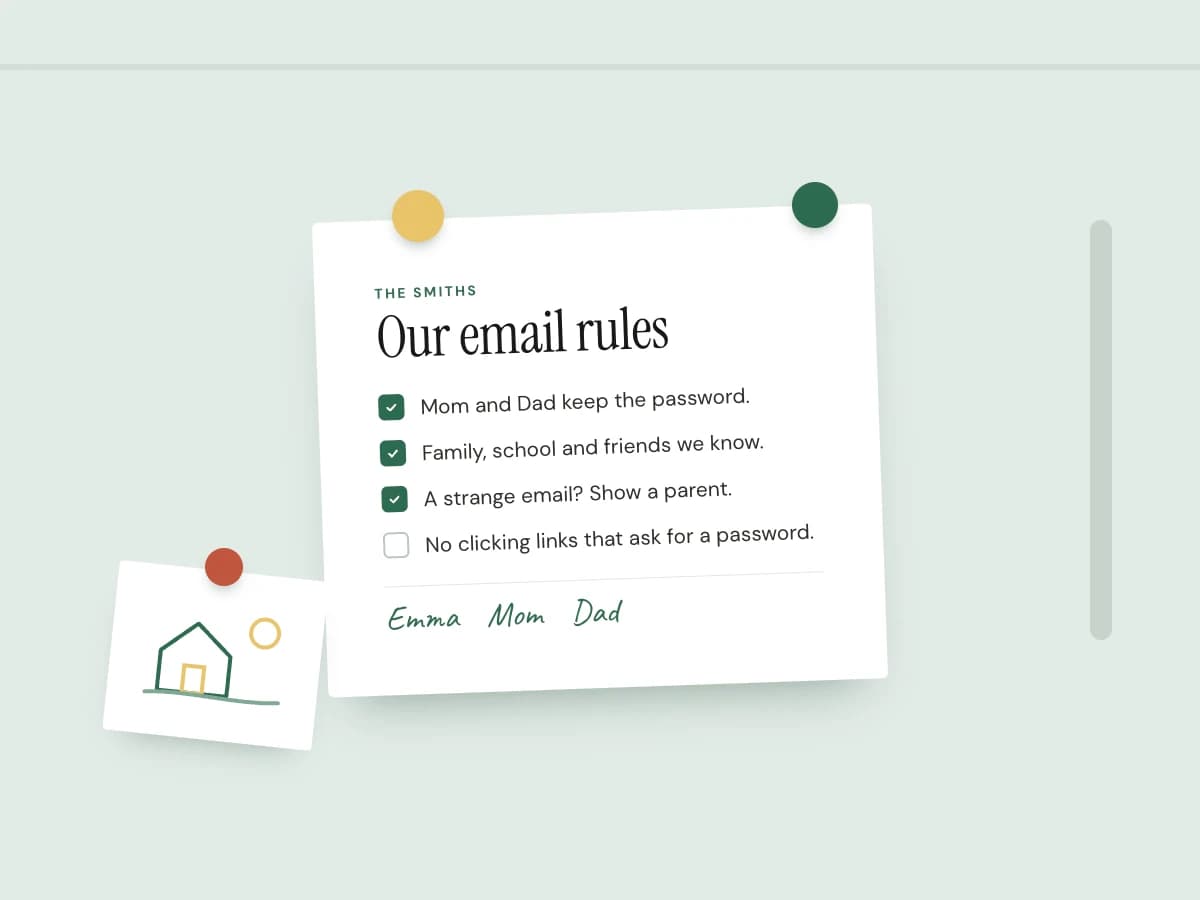
Our email rules
0 of 6 agreed. Go through them together.
Does a parental control app cover email?
Mostly not. Of the twelve apps we compared, Bark is the only one whose own help pages describe checking a child's mailbox, and only for Gmail, Outlook, Yahoo, iCloud, Comcast and AOL. The rest filter websites and set time limits, which is useful, but email arrives on its own. Our parental control apps comparison has the details.
Questions parents ask
There's no set age. Many kids need one when school asks for it, often between 8 and 12. Younger children can use one with a parent, for notes to grandparents and family photos. What matters more than age is that you create it, know the password and decide who gets the address.
Yes, if you create it. In the US, Google requires a child to be 13 to manage their own account, so a younger child's Gmail has to be made by a parent in Family Link.
Google emails both of you. Your supervision settings stay as they are until the account is updated, and Google says a child needs a parent's approval to stop supervision until 18. The extra Gmail rules for under-13s, like spam never reaching the inbox, are made for that age group only.
Only a few. With Family Link and a child under 13, you can sign in to the account, block senders on your child's device, and Gmail keeps spam out entirely. There are no alerts and no approved-contacts list. For alerts, Bark Premium connects to Gmail and checks what's sent and received.
For a child under 10 who will write to a handful of people, an email service made for kids, because you approve every contact and see what arrives from strangers. For an older child, an address you create and keep the password to, with a few rules everyone agrees on, and one they won't have to replace when they outgrow a kids' service.
Read next
- Parental control apps compared: price, devices, and which ones see email.
- What is an email alias? One way to keep a sign-up address apart from the real one.
- How to create a custom email address for the whole family.
An address that grows up with them
Email on your family's own domain, for parents and kids. You create every mailbox and set the password. $19 a month for the whole family.
Find your family's domain